


Sensor-Info Web Portal
The Sensor-Info Web Portal receives sensor measurement reports from NEEM-2 units every 30 seconds. Sensor measurements are displayed, sorted, analyzed, and checked for out-of-normal conditions. If out-of-range conditions are detected, email and text message alerts are sent according to the preferences set up during iNEEM-2 installation. All received data is available for viewing with a simple web browser and a password. User-selected data can be downloaded as CSV files.
Sensor Synergy provides all NEEM-2 customers with 24/7/365 access to our Web-based computing system - our Web portal at https://Sensor-Info.com. Using secure Web-based "data plumbing", this computer receives periodic updates of all sensor measurements acquired by the NEEM-2 hardware during the prior 30-seconds. The most recent sensor measurements (sensor data) are analyzed for out-of-normal measurement values. When each NEEM-2 is initially setup, the user indicates what values for each sensor are acceptable values and which values are considered "out-of-normal". Also during setup, the user indicates the name and contact number for key staff members that should be notified when and out-of-normal measurement is recorded. An email and/or text alert message is sent to each key person when an out-of-normal measurement is detected at the indicated alarm level.
After analyzing the sensor measurement data for out-of-normal conditions, the data is stored in our Web-based, portal database for later viewing by authorized users. Recent data from the past 30 minutes, the past 48 hours or 1 -week of data from 7 months can be viewed at https://sensor-info.com and if required downloaded into a CSV file. Authorized users are given a username and password by the individual who initially sets up the NEEm-2 at your location. Users can always change their password or add new users when accessing the NEEM-2 system from the local area network at your facility.
These periodic sensor measurment updates are only transmitted to our Web portal from operating NEEM-2 systems that have been enabled for Internet access. It is important to note that some NEEM-2 units, at the user's discretion, may be setup only for local area network access. No data leaves the facility unless the user selects the "Internet" mode at setup time. NEEM-2 units setup only for local area network access will not be able to utilize the out-of-normal alert messaging features.
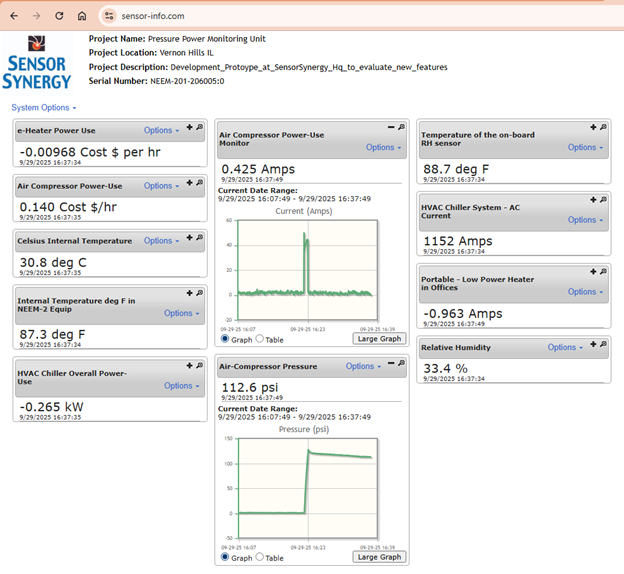
View of Measured Sensor Data using https://sensor-info.com web site and authorized name/password